The SakuraOS settings page
SakuraOS's own settings are on one page in System Settings. Open System Settings, then SakuraOS in the System group.
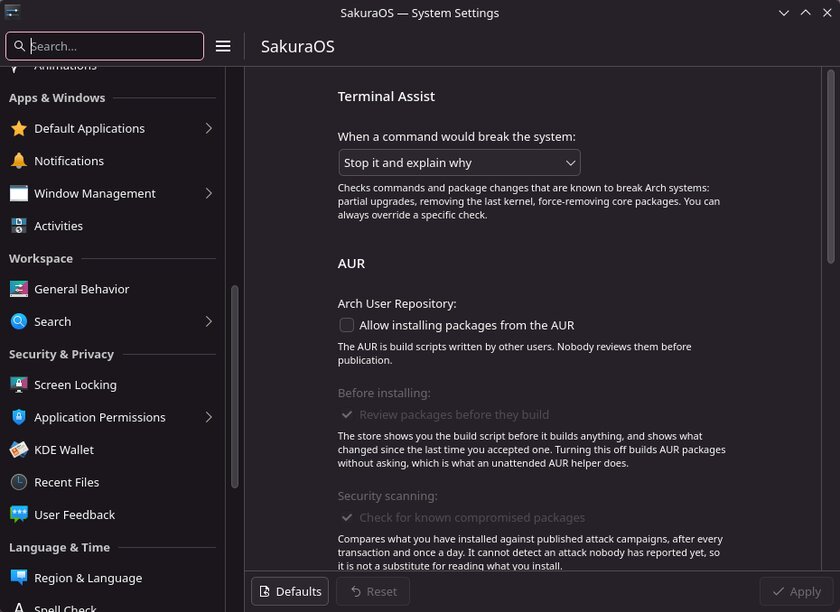
Change what you want, then press Apply at the bottom. Defaults puts everything back as it was after installing.
Terminal Assist
| When a command would break the system | What happens |
|---|---|
| Stop it and explain why (default) | The command does not run. You see why, and how to run it anyway. |
| Warn, but continue | You see the explanation, and the command runs. |
| Do nothing | Terminal Assist is off. |
See Terminal Assist.
AUR
| Setting | Default | What it does |
|---|---|---|
| Allow installing packages from the AUR | Off | Lets the App Store search and install AUR packages. The other AUR settings can only be changed while this is on. |
| Review packages before they build | On | The App Store shows you each build script, and what changed since the last one you accepted, before building. Turning it off builds without asking. |
| Check for known compromised packages | On | Checks what you have installed against published AUR malware campaigns, after every install and once a day. |
| Command-line helper | None installed | Installs yay or paru for using the AUR from a terminal. Choosing one removes the other. |
The list shows the helper that is installed, or None, use the store only. Choosing one installs it, and the line under the list says when that has finished. Both helpers are built and signed by SakuraOS rather than compiled on your computer. The App Store does not need either of them. See The AUR.
Windows programs
Turns support for Windows programs on or off. Turning it on downloads and installs Wine, about 1 GB. Turning it off removes it again. When it is on, programs you have installed are listed, each with an option to remove it. See Windows apps.
Updates
| Setting | Default | What it does |
|---|---|---|
| Install updates automatically | On | Installs updates each night after taking a restore point. When off, updates are only checked; install them from the Update Center. |
| Updates that have been tested first | On | Holds back any update that failed on SakuraOS's test machine. See Updates. |
| Install updates at | 03:00 | The time automatic updates start. |
| Only when plugged in | On | On a laptop, waits for the charger. |
The same settings are on the Schedule tab of the Update Center; changing one changes the other.
Last checked against the SakuraOS release of 3 October 2026. If your system behaves differently from this page, the page is wrong: please report it.