Updates
SakuraOS updates itself at night, after taking a restore point. You do not have to do anything, but you can see what is happening and update by hand at any time in the Update Center.
What happens automatically
- Every night at 03:00, give or take 20 minutes, SakuraOS checks for updates and installs them. If the computer was off or asleep, it does this the next time it is on.
- On a laptop, it waits until the charger is plugged in.
- A restore point is taken before anything is installed.
- The computer never restarts by itself. If an update needs a restart, the Update Center says so.
- Flatpak and Snap applications are updated by the App Store at 04:00.
To change the time, or to turn automatic updates off, see SakuraOS settings or the Schedule tab in the Update Center. They are the same settings.
The Update Center
Open Update Center from the application menu. It has four tabs:
| Tab | Shows |
|---|---|
| Status | How many updates are ready, how many are held back, whether a restart is needed, and how many restore points you have. Install now installs the updates straight away. |
| Available | Every update, with what the package is and what on your computer needs it. |
| History | Your restore points. See Going back. |
| Schedule | When updates install. |
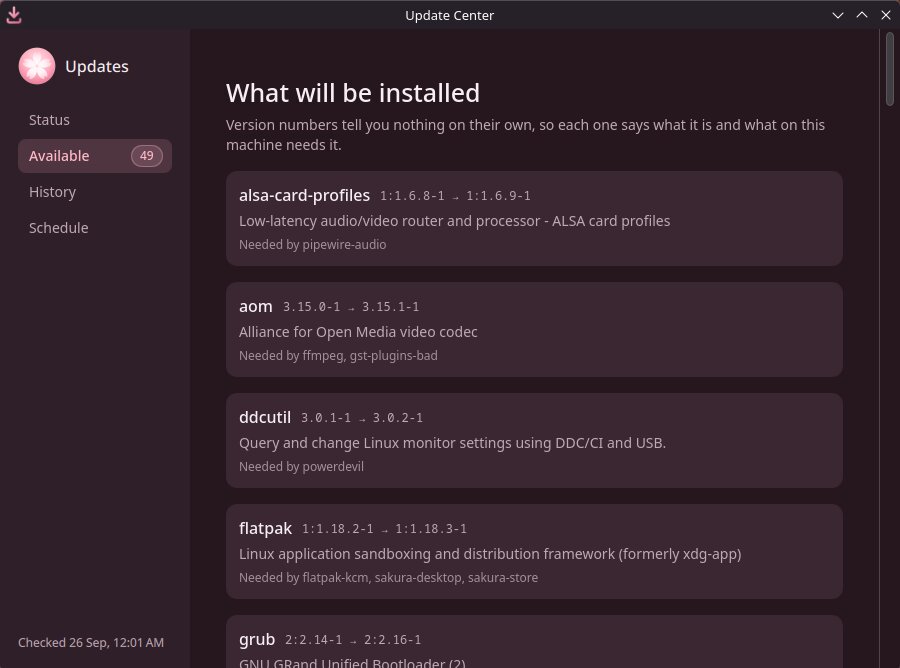
Updating by hand
In the Update Center, press Install now on the Status tab. A restore point is taken first, exactly as for automatic updates.
From a terminal, the same thing:
sudo sakura-update apply
sudo pacman -Syu also works, and also takes a restore point, but it
does not hold back the updates described below.
Updates that are held back
Some updates are not installed automatically. They are listed in the Update Center with the reason. There are two:
- Arch Linux says the update needs a manual step. Arch publishes a news item when an update needs someone to do something first. SakuraOS reads those notices and holds back only the packages they are about, for two weeks after the notice is published. The Update Center shows the notice, with a link to read it in full.
- The update broke SakuraOS's test machine. Every night a SakuraOS machine is installed from scratch, given the day's updates, restarted and checked. If it does not survive, those updates are held back until they are fixed. This is the Updates that have been tested first setting, which is on by default.
An update that needs a held package waits with it, so nothing is installed half-way. Everything else installs as normal.
If you have read the notice and done what it asks, or it does not apply to your computer, press Install held updates too in the Update Center. That installs them now and stops holding anything back for that notice. From a terminal:
sudo sakura-update apply --include-heldIf your computer cannot reach these notices, for example because it is offline, nothing is held back. Security updates are never blocked just because a check could not be made.
Applications from the AUR
Applications you built from the AUR are never updated automatically, because updating one means running a new build script. The App Store tells you when a newer version is available. See updating AUR packages.
If an update causes a problem
Go back to the restore point from before it. See Going back.
Last checked against the SakuraOS release of 3 October 2026. If your system behaves differently from this page, the page is wrong: please report it.